
part of a series, “Harmonizing Across Multiple Platforms“
You want to ensure that your work as a family historian and your family’s history are well-represented online. To accomplish that you will need to pay attention to the information that appears on all of the websites that might include your family.
But, before you try to dive in and “fix” everything that is out in the world (not recommended!), you need to consider how these different platforms function, what they are designed for, and how much effort you are willing to expend on updating them.
I’m talking less about “this is how you click the buttons to make changes” and more about “how do you make it easier for people to find what they are looking for?” These are Strategies for maintaining work on the same families over time, rather than Tactics for specific tasks.
One major player that you shouldn’t ignore is Find a Grave.1 For about the first half of its existence, it was one of several online databases for cemetery information managed by individual people. In 2013, it was acquired by Ancestry.com, and while it still maintains an independent existence, that corporate relationship is important to keep in mind.
Find A Grave: the Strengths
There are few key points about Find A Grave that everybody should know:
- It’s free*. (So create an account and experiment with finding your ancestors’ memorials.)
- It’s collaborative – meaning anyone with a free account can:
- Request headstone and gravesite photos (which are fulfilled by volunteers)
- Submit photos (primarily of cemeteries and gravestones – read the Terms of Service carefully)
- Edit individual memorials (why we’re talking about it today)
- Link memorials (parents to children, spouses, etc.)
- “Collect” memorials in Virtual Cemeteries
(I wrote about this site a while back in Using Find-A-Grave, and I touched on some of these points there. If you’re a Mightier Acorns completionist, you can go check that piece out.)
*Free!
…meaning, you don’t pay money for an account or to use the services of fellow volunteers. But read the Terms of Service carefully when you sign up, and again before you contribute anything like family photos to the site. Pay special attention to Ancestry’s use of AI with regard to your contributions.
There’s a useful and concise history of the site on their Wikipedia article that gives more detail, but the gist is that what started out as a personal development project was sold to Ancestry.com in 2013. Over the following five years, Ancestry updated the mobile app and made improvements to the back end and user interface.
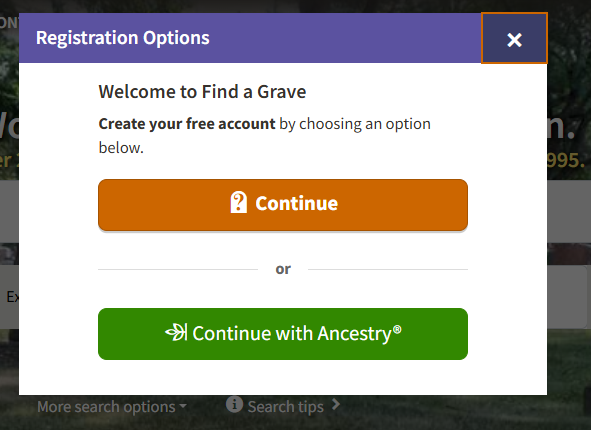
Right now, you can sign up by creating either a stand-alone Find a Grave account, or by signing in with an existing Ancestry account.
Because it is owned by a large for-profit corporation, there is always the danger that it could be converted into a profit stream or shut down. Be mindful of that possibility – and make sure that you download the photos and information you depend on and store them in your personal archives so you don’t lose access to them. In the meantime, Find a Grave remains a valuable resource for many researchers.
Set In Stone
The core value of Find-A-Grave lies in the photos and transcriptions of individual grave markers. If the only source you have for your ancestor is a photo of their headstone on Find-A-Grave, that is still one of the most reliable “records” you can have. After all, gravestones are expensive, and families usually want their loved one to be well-represented by their marker.
The rest of the site’s features revolve around that core concept. The database of cemeteries, the individual memorials, and all of the functions for editing and linking the memorials depend on finding the physical resting place of the ancestors in question.
Your key takeaway should be this: of all the great things you may find on Find-A-Grave, the only thing you can rely on as a source is that physical grave marker. You will run across people citing Find-A-Grave on other platforms as a source for their ancestors’ vital information, but when you see someone citing Find-A-Grave as a source, you should verify that the memorial has that photo before you trust the information in it.
There are cases where there is no headstone, but the memorial can still serve as evidence of the burial place. In Using Find-A-Grave, I talked about a photo request that was fulfilled with a “No Tombstone” response:
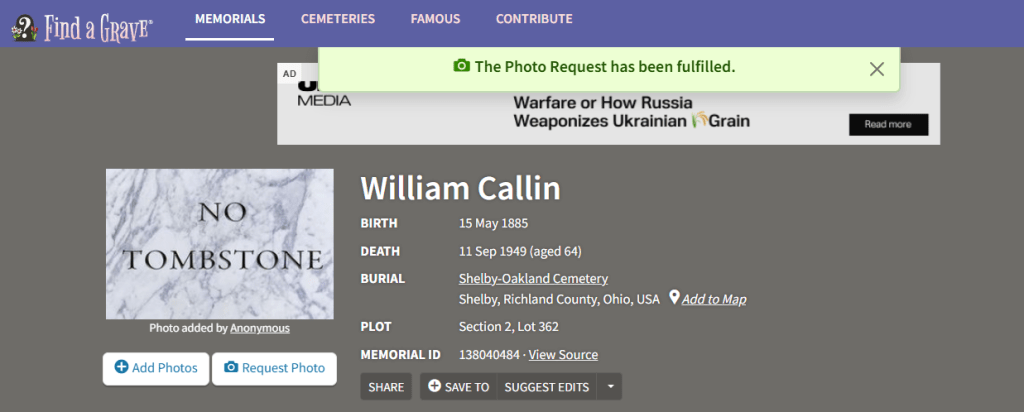
At first, it was disappointing to see the “No Tombstone” photo. The one thing that Find A Grave is most useful for is providing some physical evidence to support what you know about your target family. But I quickly moved past that disappointment to realize that “Anonymous” had provided the plot – Section 2, Lot 362 – which does confirm that William was buried in that cemetery.
Outside of headstone photos, other information on Find-A-Grave needs to be treated with skepticism. Even if there is a thorough biography with proper source citations on a Find-A-Grave memorial, it’s not appropriate to cite Find-A-Grave as the source for the other biographical information. Cite the original source instead. All of that other information – the links between memorials for parents, spouses, children and siblings; the obituaries; the photographs – can be added by anyone without including sources and only needs to be approved by the individual memorial manager. If you’re lucky, that manager is has enough experience with genealogy to ask for sources before approving changes.
Are you lucky, friend?
It is also possible to create memorials without a specific cemetery, for people who were (for example) buried at sea, or who were not interred in a specific place. Those memorials might have accurate information, but again, without that physical evidence of a grave marker, the value of having the information on Find-A-Grave is not as solid as a platform where the information can be properly sourced.
Using Find-A-Grave as your main platform
In our first HAMP post, I talked about the unicorn of the one-stop shop, and there are people on Find-A-Grave who seem to have made that platform the “one place” where they try to manage their family trees.
If that’s your choice, I wish you well, and I applaud those who attempt to keep the information on the platform as accurate and well-sourced as possible. When the memorials are well-organized and have their headstone photos in order, the site can look very satisfying. Here is one of My Sixteen, for example (and almost all of the hard work was done by others on that page, not by me!):

But, Find-A-Grave wasn’t designed to manage or house family trees, and you may find it extremely difficult to use that way.
The main drawback (aside from the lack of a system for enforcing proper sourcing) is that only the manager of each memorial has the ability to approve edits. This means that if you run into a situation where a non-relative “owns” a memorial, or if the person is a relative but is not responsive, you may have trouble getting necessary edits approved. If you’re lucky, the person is a skilled genealogy researcher familiar with verifying sources, but if not, then the information that is/is not allowed on the memorial will be up their judgment (for better or worse).
If you go in with a positive attitude and practice the de-escalation techniques we discussed in the first HAMP post, you shouldn’t have any lasting problems. But unless you become the manager for every profile you care about, you won’t have the same freedom to edit and update information that you have on other platforms.
Harmonizing Tips:
Wherever you decide your “one-stop shop” should be, Find-A-Grave will inevitably be a part of your research. There are several things you can do to help improve the completeness and the utility of the database that can make it more useful and reliable. If you refer to the Nancy Ellen Shriver Witter image above, you’ll see four words to the right of the “Find a Grave” logo:
Memorials – Cemeteries – Famous – Contribute
Clicking “Contribute” can get you started – you can add memorials from here, manage your photo requests and suggested edits, upload photos (read the TOS, first!), and get involved Transcribing photos on the site.
- If you are one of those marvelous people willing to volunteer to visit cemeteries in your area and fulfill photo requests, adding GPS information to the memorials is an important part of that project. Click on “Cemeteries” to see open requests at cemeteries in your area. And check out “Five Easy Steps for Better Grave Stone Photography” by David Shaw at Serengenity to make your contributions count.
- Transcribing headstone photos can be a huge help, especially with photos that may be hard to read due to lighting or the condition of the headstones.
And, of course, the Virtual Cemeteries feature lets you organize the memorials you frequently visit, or that you have an interest in. I’ve used this to organize my search for the gravesites of my 28 grand/great-grand/and 2nd-great-grandparents.
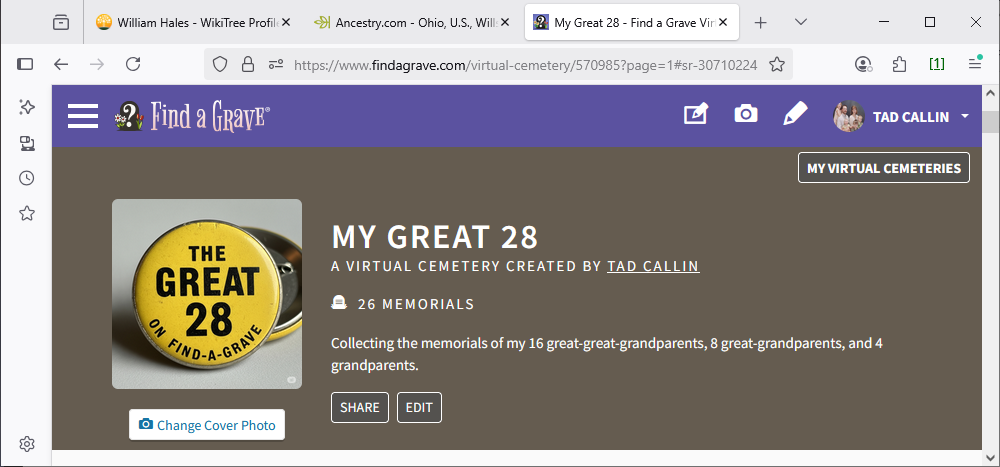
(You may have noticed I only have 26 out of the 28 here – I am still missing Emil Frey and his wife Emily Amelia Opp.)
Next up…
In the next HAMP installment, I plan to take a look at FamilySearch.org – a free site with lots of records and a “one family tree” feature that requires some close attention. If you have a favorite site you’d like to talk about in a future post, comment or use the Contact Form. I’d love to hear from you!
- Note: I am writing from an American perspective – I know I have an audience in Australia and Europe, so if you have different experiences with Find-A-Grave, or if there is a better resource for grave markers in the rest of the world, please leave a comment or send me a note. ↩︎


 Mightier Acorns
Leave a reply to Mightier Acorns Cancel reply